
Antibody annotation#
This tutorial shows you how the platform automatically annotates antibody sequences on upload: identifying CDR regions, flagging known liabilities, and calling germline V-genes, alleles, and mutation load, all without a separate annotation step.
Use this as a starting point for screening a dataset for developability risk or germline diversity before moving on to embedding, clustering, or scoring.
If you run into any challenges or have questions while getting started, please contact OpenProtein.AI support.
What you need before starting#
You need a sequence-only CSV file of antibody sequences. No header row or extra metadata columns are required, the platform detects VH and VL chains on its own and needs no manual chain labeling or numbering.
Upload your dataset#
Upload your CSV the same way you would a dataset<https://docs.openprotein.ai/web-app/opmodels/uploading-your-data.html>. You do not need to upload a csv with properties. If the sequences are recognized as antibodies, the table automatically gains a set of CDR1 / CDR2 / CDR3 / Liability chips above the grid, and an Antibody entry appears in the table toolbar alongside Dataset Info, Kabat, Consensus, Settings, Collapse, Filters, and Export.
No separate annotation job is needed. Non-antibody protein datasets will not show the Antibody control, since there’s no CDR or germline structure to annotate.
Viewing the antibody settings#
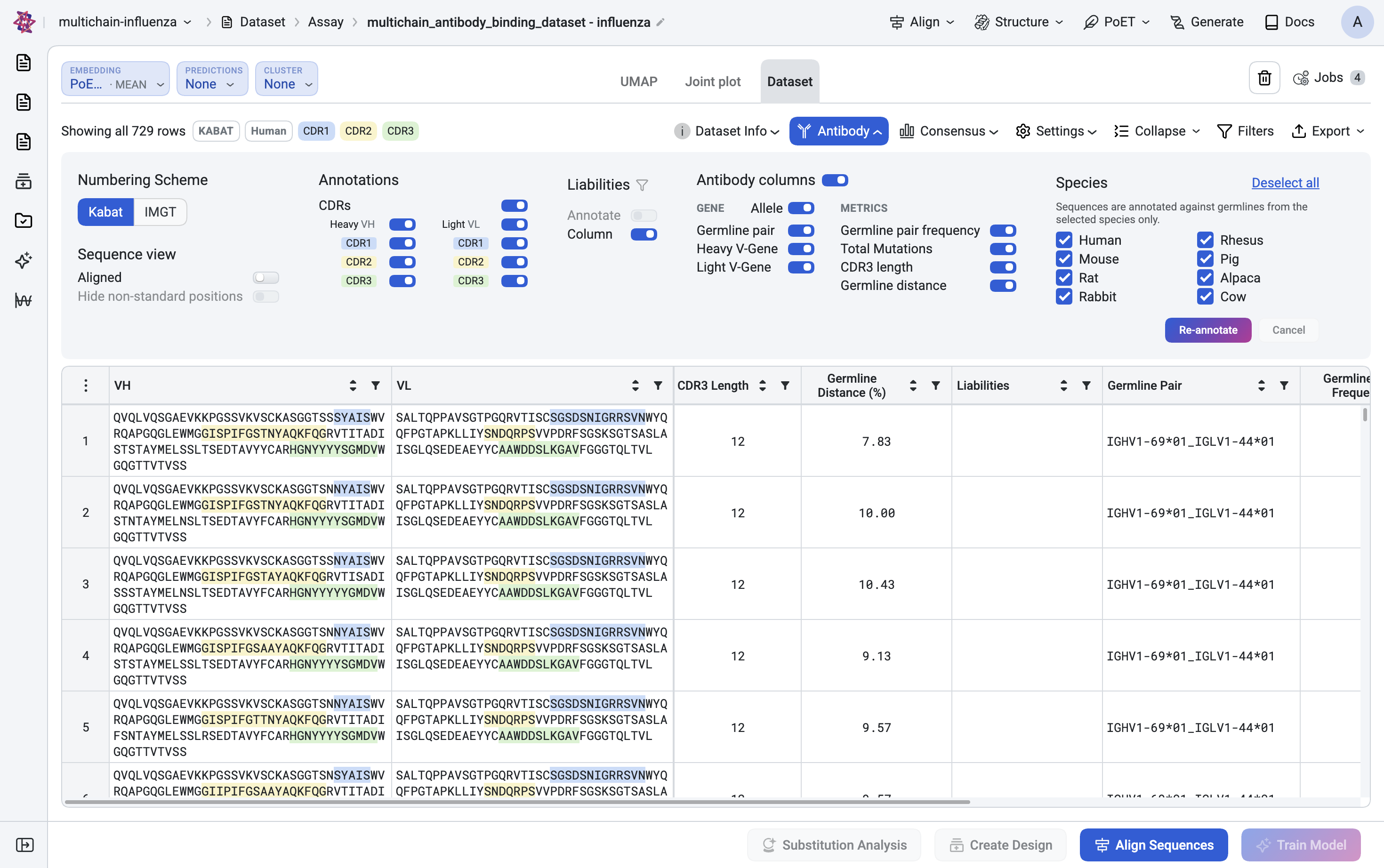
Click Antibody in the toolbar to open the annotation panel.
Highlight CDRs lets you toggle Show CDR1 / CDR2 / CDR3 independently. Each region is color-coded directly inside the VH and VL sequence text in the table.
Sequence view offers Aligned (pad sequences to a common length for side-by-side comparison) and Trim non-standard positions.
The numbering scheme used to define the CDR boundaries (Kabat, by default) is set from the separate Kabat dropdown next to Antibody in the toolbar.
Review flagged liabilities#
The Liabilities section flags residues or motifs known to affect antibody developability.
Choose Highlight to mark liabilities directly in the sequence text while still seeing every row.
Switch to Filter to narrow the table down to rows that contain a flagged liability.
Show column adds a dedicated Liability column to the grid, matching the red Liability chip shown above the table alongside the CDR chips.
Use Highlight while you’re still exploring the dataset broadly, and switch to Filter once you’re ready to narrow in on sequences that need to be deprioritized or redesigned around a specific liability.
Choose which antibody columns to show#
Show antibody columns controls which germline and mutation metrics appear in the grid. It’s split into two groups:
Gene: Germline pair, Heavy V-Gene, and Light V-Gene, each with an Allele toggle that switches the calls between gene-level (for example
IGHV1-69) and allele-level (for exampleIGHV1-69*01) precision.Metrics: Germline pair frequency, Total Mutations, CDR3 length, and Germline distance, numeric summaries computed from each sequence’s alignment back to its called germline.
Read the annotated table#
Every selected column appears directly in the grid. VH and VL show the full sequence with CDR1, CDR2, and CDR3 shaded in distinct colors inline, followed by the germline and mutation columns you selected: Germline Pair, Germline Pair Frequency, Heavy V-Gene, Light V-Gene, Total Mutations, and more.
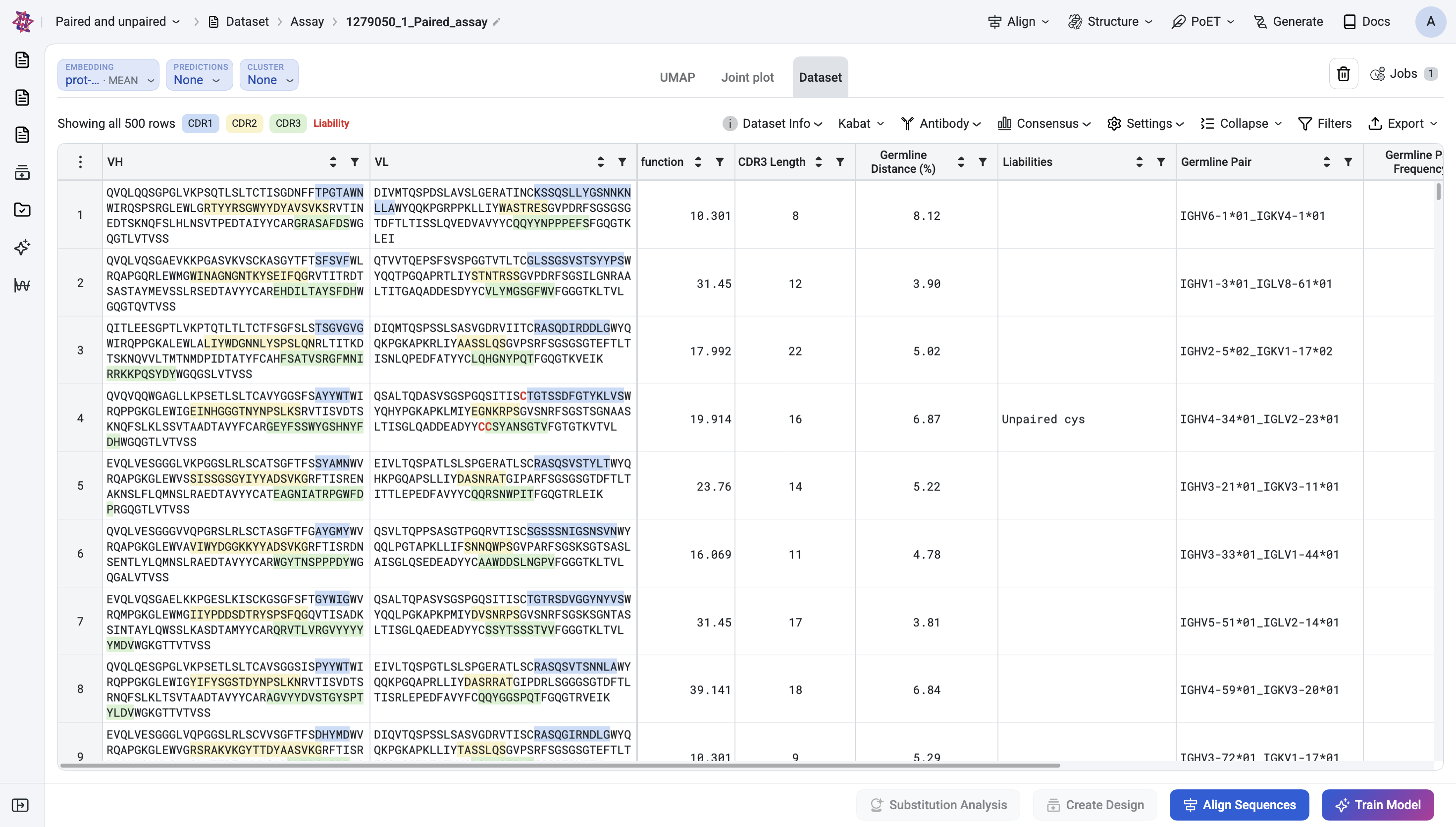
From here, sort or filter on any of these columns the same way you would elsewhere in the table, and combine them with Embedding, Cluster, or Predictions to bring germline and liability context into hit selection.
Column reference#
Column |
What it tells you |
|---|---|
Germline Pair |
The closest matching heavy and light germline gene (or allele, if the Allele toggle is on) called together, for example |
Germline Pair Frequency |
How often this exact germline pairing occurs across the dataset, a quick signal of whether a sequence sits in a common or rare germline background. |
Heavy V-Gene / Light V-Gene |
The called germline V-gene for each chain individually, with the Allele toggle switching between gene-level and allele-level precision. |
Total Mutations |
Count of amino acid differences between the sequence and its called germline, a proxy for how far a sequence has diverged through affinity maturation or engineering. |
CDR3 length |
Length of the CDR3 loop, useful for spotting unusually long or short CDR3s that may affect developability or expression. |
Germline distance |
Overall sequence distance from the called germline, a broader divergence measure than Total Mutations alone. |
Liability |
Flags residues or motifs associated with known developability risks (for example deamidation, oxidation, glycosylation sites), shown inline via Highlight or as its own column via Show column. |
Tips and troubleshooting#
Question |
Answer |
|---|---|
Do I need to tell the platform which columns are heavy chain versus light chain? |
No. A sequence-only upload is enough, the platform detects VH and VL chains and numbers them automatically. There’s no separate setup step before the Antibody panel becomes available. |
Why would I turn on Allele instead of leaving germline calls at the gene level? |
Allele-level calls (for example |
My sequences aren’t getting annotated as antibodies. |
Confirm the upload is a plain sequence-only CSV or FASTA (no unexpected extra columns before the sequence data) and that the sequences resemble recognizable antibody variable domains. Non-antibody protein datasets won’t show the Antibody control since there’s no CDR or germline structure to annotate. |
How does this relate to Embedding, Cluster, and Predictions? |
Antibody annotation is descriptive context computed directly from sequence, it doesn’t require an embedding job to run first. You can use it on its own to screen for liabilities and germline diversity, or alongside Embedding, Cluster, and Predictions for a fuller view when selecting hits. |
Please contact OpenProtein.AI support if the suggested solutions don’t resolve the issue.